
Writing · Templates
How to proofread a wedding website before sharing it
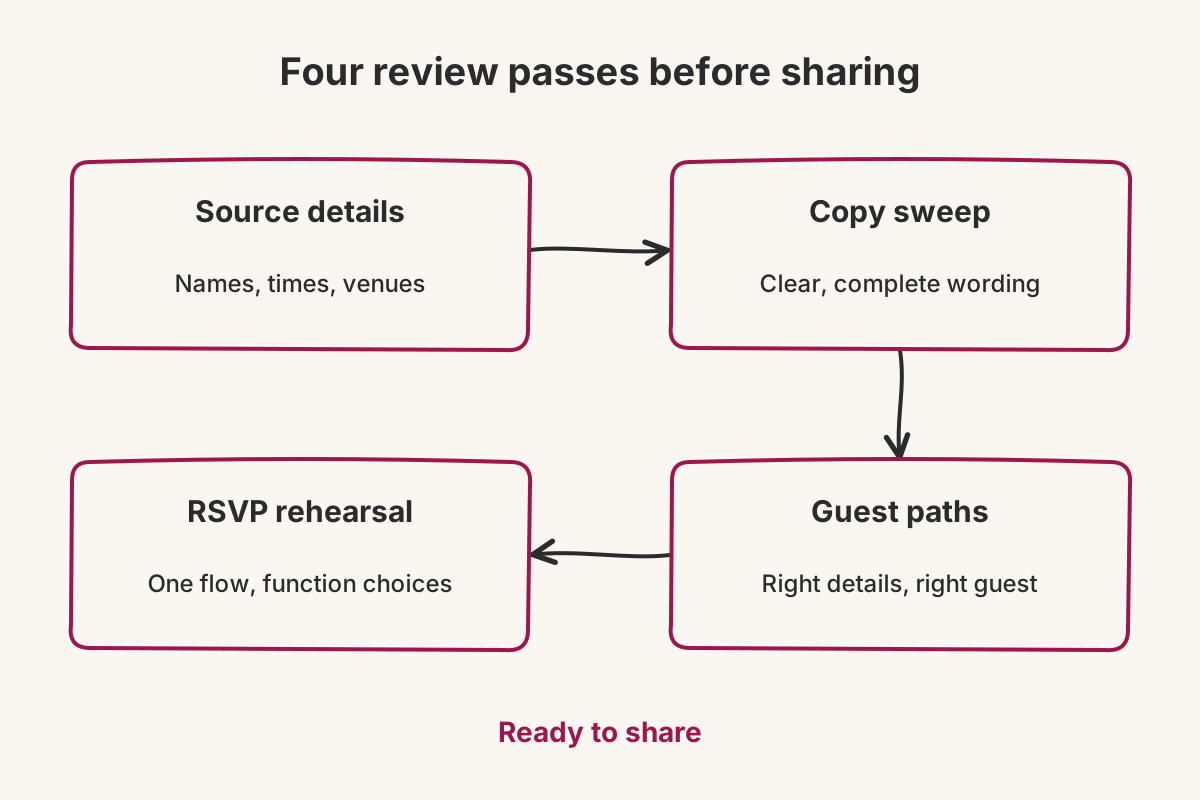
Proofread a wedding website in four passes: verify each function against its source, remove ambiguous or unfinished copy, role-play different guest journeys and rehearse the RSVP. Use the checklist below before sending any links, then repeat the affected pass whenever the schedule or invited list changes.

Proofread a wedding website in four passes: verify each function against its source, remove ambiguous or unfinished copy, role-play different guest journeys and rehearse the RSVP. Use the checklist below before sending any links, then repeat the affected pass whenever the schedule or invited list changes.
A conventional spelling check catches small errors. It does not catch a perfectly spelled old address, a placeholder left under the Mehendi or a colleague receiving the wrong personal link. Make the final review a short procedure with named passes. That gives the family a shared definition of “ready” instead of one person scrolling until the page feels finished.
What should you compare with the source?
Begin with Source details. Assign one reviewer to each function and have them compare the published entry with the latest confirmation from the person responsible for that event. Do not use a screenshot of an earlier website draft as the source.
For every Haldi, Mehendi, Sangeet, ceremony and reception shown, verify:
- function name, day and calendar date;
- guest arrival time, including am or pm;
- full venue name and the map destination;
- any transport, clothing or day-of contact note;
- the people meant to receive that function.
Vowframes gives every function its own venue, timing and invited list. Work down one event completely before opening the next. If a place or time changed, delete the superseded value; do not leave an old detail visible with a correction underneath.
Which wording mistakes deserve a separate pass?
Use Copy sweep for language rather than logistics. Search for brackets, “TBC,” sample names and dates copied from templates. Read every button instruction, event description and contact line aloud. Awkward phrasing is easier to hear than to spot while skimming.
Look closely at words that change the scope of an invitation. “Join us for the wedding week” is wrong for a reception-only guest even when every date elsewhere is accurate. Prefer “the functions on your invitation” when different people are attending different parts of the celebration.
Check consistency too. Use one spelling for each function, one time format and one name for each venue. If the page alternates between “Wedding,” “Ceremony” and a family nickname for the same event, a guest may wonder whether they are separate plans. Clarity matters more than variety in practical copy.
How should you role-play different guest journeys?
For Guest paths, choose three deliberately different people: someone attending most functions, someone invited to two and someone coming only to the reception. Before opening anything, write down what each person should find. Then use their actual links and compare the result with your note.
A Vowframes guest opens a link tied to them, and the wedding URL presents the functions assigned to that guest. Check for omissions as carefully as extras. The reception-only view should lead directly to useful reception information. The multi-day view should make the next event easy to identify without requiring a WhatsApp search.
Repeat the exercise on a phone. Follow the map route, find the arrival time and locate the day-of contact using only what is visible to that guest. You are testing whether the page answers a real question under time pressure, not whether every section looks balanced on a large screen.
What should the RSVP rehearsal prove?
Finish with an RSVP rehearsal. Use a link containing several invited functions and move through the complete response. The guest should answer once across those events while still making an attendance choice for each one; Vowframes stores the results per function. Confirm that the wording never turns that into one yes or no for the entire wedding.
Then repeat with a single-function invitation. It should ask only about that event. Compare the resulting function counts with the decisions entered during the rehearsal, then remove or clearly separate any test response according to the family's working process.
Mark the site Ready to share only when all four passes are complete. Open the exact personal link before pasting it into WhatsApp, SMS or email, confirm it belongs to the intended recipient and use one current version of the invitation message. The final check is small by design: right guest, right link, right functions.