
Writing · Guides
How to share UPI and bank details privately with wedding guests
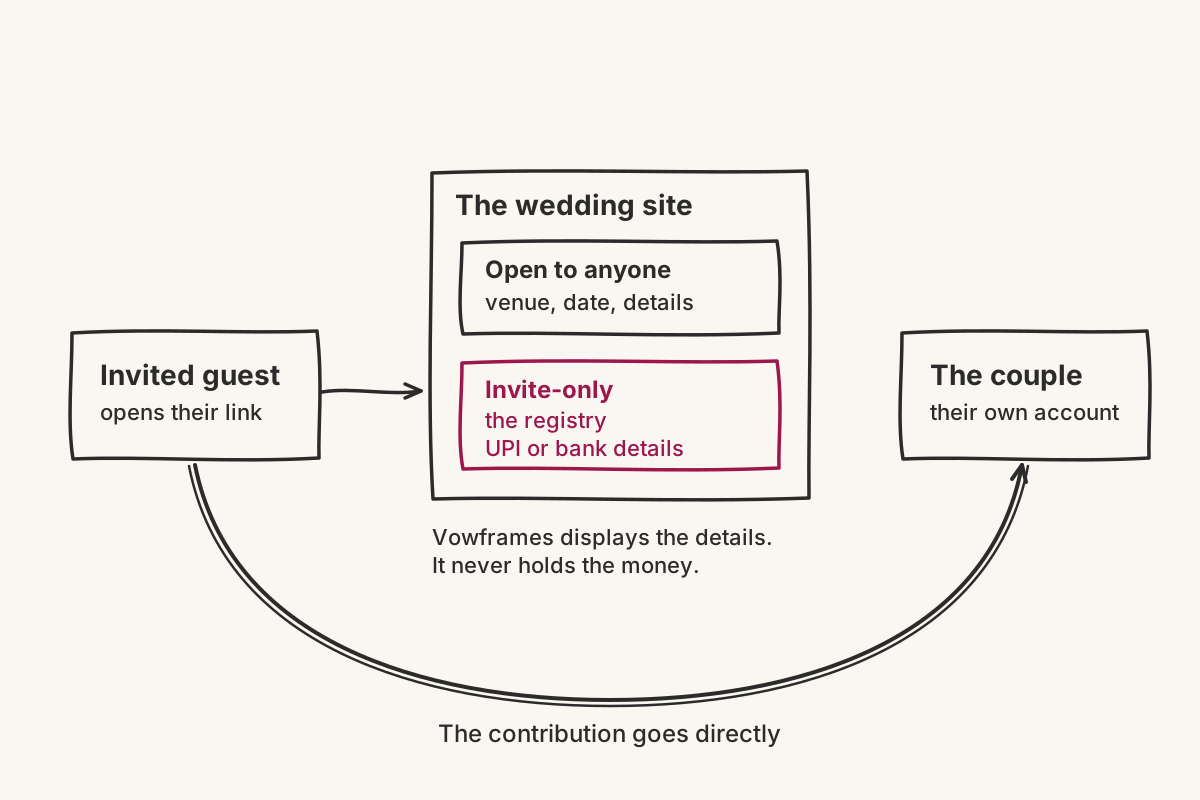
Share UPI or bank details through a private wedding registry that only invited guests can access, rather than posting them in a group chat or on a public page. With Vowframes, contributions go directly to the couple; the platform displays the payment details but does not collect or process the money.

Share UPI or bank details through a private wedding registry that only invited guests can access, rather than posting them in a group chat or on a public page. With Vowframes, contributions go directly to the couple; the platform displays the payment details but does not collect or process the money.
The awkward part is not deciding whether to accept a gift. It is giving a relative a useful answer without placing personal payment details in a message that can be forwarded far beyond the guest list. A private registry keeps the answer available to the people who need it, without turning the family WhatsApp group into the permanent record.
Why put UPI or bank details on a private wedding website?
A chat message is easy to send and difficult to control. It gets copied into another family group, buried under venue questions, or separated from the context that says whose account it belongs to. Weeks later, somebody asks for the same details again and a different version begins circulating.
A private wedding page gives guests one place to return to. Vowframes can keep some wedding details open while restricting others to invited guests. Its registry shares UPI or bank details privately with those guests, so the payment information does not need to sit on the public part of the site.
This also separates two different jobs. WhatsApp, SMS or email can carry the wedding link. The private registry behind that link carries the details a guest needs when they decide to contribute.
What should the wedding registry explain?
Keep the section short enough to check at a glance. Name the account holder exactly as a guest should expect to see it. Present the UPI or bank details clearly, then add one plain sentence explaining that a contribution is optional. If more than one account is listed, state who each one belongs to instead of making guests guess.
Do not surround the practical information with a long gift note. Guests opening this section have usually already decided what they want to do. They need to confirm that they are using the right details and understand where their contribution goes.
Before sharing the site, ask one trusted relative to read the registry without extra context. If they have to message you to identify the account holder or choose between two sets of details, revise the section.
Does Vowframes collect the gift payment?
No. Vowframes displays the couple's UPI or bank details, but it never processes the contribution. The money goes directly to the couple.
That distinction should stay clear in the wording. Avoid language such as “pay through Vowframes” or “Vowframes checkout,” because it describes a transaction the platform does not handle. A more accurate instruction is: “Use the details below to contribute directly.”
The registry is included in every Vowframes wedding site plan. It is part of the wedding website rather than a separate payment service, so guests can find it through the same wedding link they already received.
Who should be able to see the payment details?
Restrict the registry to invited guests. Vowframes supports invite-only wedding sites, and each guest opens a link tied to them. That gives the couple a defined audience for information that should not travel as freely as a venue name or public celebration announcement.
If parts of the site are open, check the registry separately rather than assuming every section follows the same visibility. Vowframes can leave some details open while keeping others invite-only. Review the site through a guest link and confirm that the registry appears where intended.
What should you check before sharing the registry link?
First, compare every character in the UPI or bank details with the source the account holder provided. Then check the account-holder name and remove any old version from family drafts or saved messages.
Next, open the wedding site as an invited guest. Confirm that the registry is visible there and that the details are not exposed on an open page. Finally, ask the account holder to review the exact published section.
When something changes, update the private registry first. Then direct guests back to the wedding link instead of sending replacement payment details into multiple chats. One current source is calmer for the family and clearer for the guest.